
Ayafy feature · Free
Read the Quran Your Way
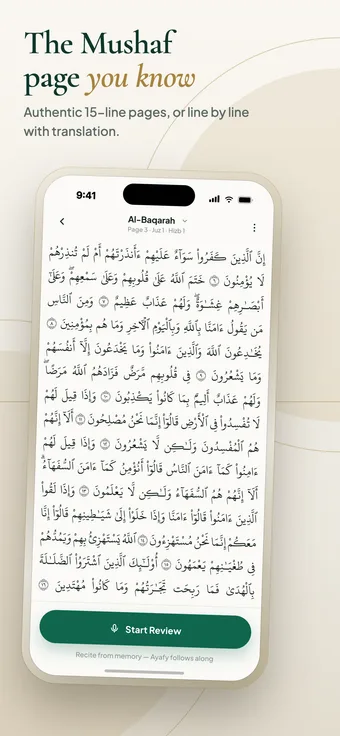
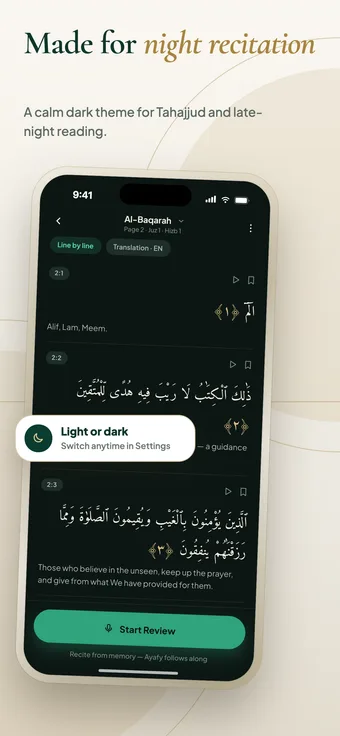
Ayafy’s Quran reader offers the authentic 15-line Madani Mushaf page — the layout many huffaz memorize from — and a line-by-line view with an English translation under each ayah. Both work in light and dark mode, and you can start an AI review from any page.
Step by step
How it works
-
Open the Quran tab and pick a surah, juz or page.
-
Switch between the 15-line page and line-by-line layouts.
-
Bookmark any ayah in line-by-line view.
-
Tap Start Review whenever you are ready to recite from memory.
Inside the feature
What you get
- 15-line Madani Mushaf page layout (604 pages)
- Line-by-line layout with English translation
- Ayah bookmarks
- Surah, page, juz and hizb shown on every page
- Continue reading from where you left off
- Calm dark theme for Tahajjud and night reading
Which Mushaf layout does Ayafy use?
Ayafy uses the authentic 15-line Madani Mushaf page layout with 604 pages, plus a line-by-line layout with translation.
Does Ayafy include a Quran translation?
Yes. The line-by-line view shows an English translation under each ayah. Translations in more languages are coming soon.
Can I listen to Quran recitation in Ayafy?
Not yet. Quran recitation audio from renowned qaris is coming soon, so you will be able to listen to each ayah as you read and memorize.
Does Ayafy have a dark mode?
Yes. Switch between light and dark themes at any time in Settings.
Keep exploring
More Ayafy features
Free on iOS and Android
Try Quran Reader in Ayafy
Every Ayafy feature is free. Download the app and start today.